



How to edit your listing
When you sign up to this site and add your entry into it, your details are stored in the website. You can regain access later and edit your listing by using the same details you used when you created it.
You will need either the email address you used, or the user name if you set one up at the time and your password. If you have forgotten your password, then you can recover a new one using your registered email address.
Recovering a lost password
To recover a lost password you need to go to this screen, and click on the lost password link. For this website the screen is here: https://prestwood-va.org.uk/business/wp-admin/ The following screen shots show you how this work, and what you need to do to recover a password for this system.

Click on the Lost your password link. This will take you to another screen. On this screen you need to enter the same email address you used when the entry was created, or your user name if one was set.

How to get a link to reset your password
Enter your username or your full email address in the box and then click on the Get New Password button.
The website will send a link to your email address. You need to then go to your email account and look for the email. You will find a link in the email. Click on the link. This will take you back to the website. A new password will automatically be issued by the website. We recommend you use the password issues because it is very complex and unlikely to be guessed or hacked. You may substitute the password provided with your own. However do take care here, WordPress websites always receive a lot of attention from hackers. If you use a simple password, it is likely your listing may end up hacked.
When your password is presented to you on the screen, do not be fazed because it looks complicated, or you cannot remember it. Just take a copy of it and keep it somewhere safe. You may find depending on how your browser is set up that you can save the password in the browser. The way this works is your browser will automatically fill in your username or email address and the associated password when it knows you are on this website again.
However, it is unlikely that you will keep changing your entry. You can simply discard the password, and recover a new one the next time you wish to change anything.
Logging in
Go to the following address to login to the website with your new password: https://prestwood-va.org.uk/business/wp-admin/
When you login you will arrive at the Dashboard page which is limited administration area in the website. Look for the link at the top of the page as indicated in the image below and click on it.
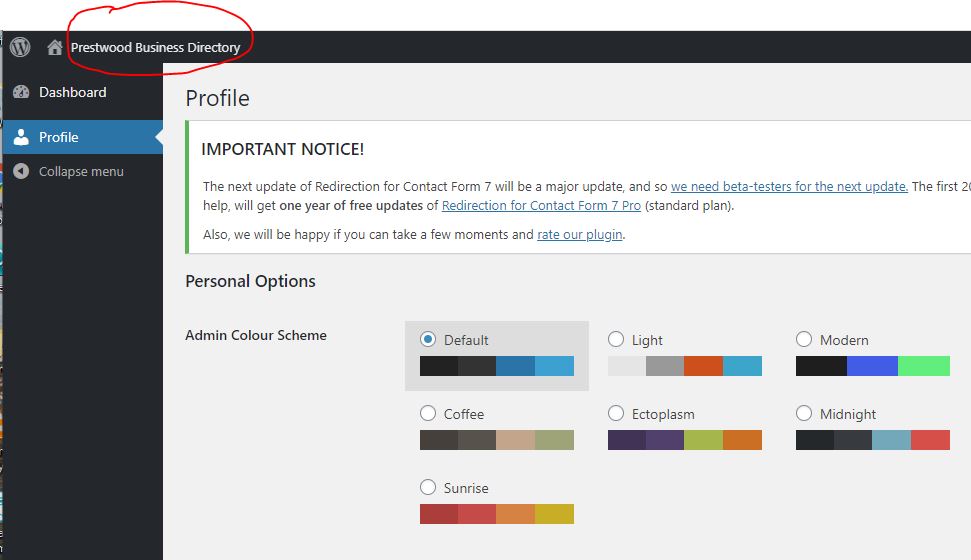
This will take you back to the home page. The difference however is you are now logged into the website.
Next visit the directory entry for your business/ service. You will see there are now several buttons at the bottom. You can now edit it, or delete it.

Click on the Edit button at the bottom of your listing. A form will come up which is similar to the form you used when you made the entry. You can now edit your listing.
When you have finished and checked your listing you can submit it back to the website which will update your listing.

Click on the Complete Listing button to finish the editing process. You have now updated your listing.